bolt Quick Answer (As of 2026)
Lighting used to be simple: flip a switch, and the room gets brighter.
Lighting used to be simple: flip a switch, and the room gets brighter.
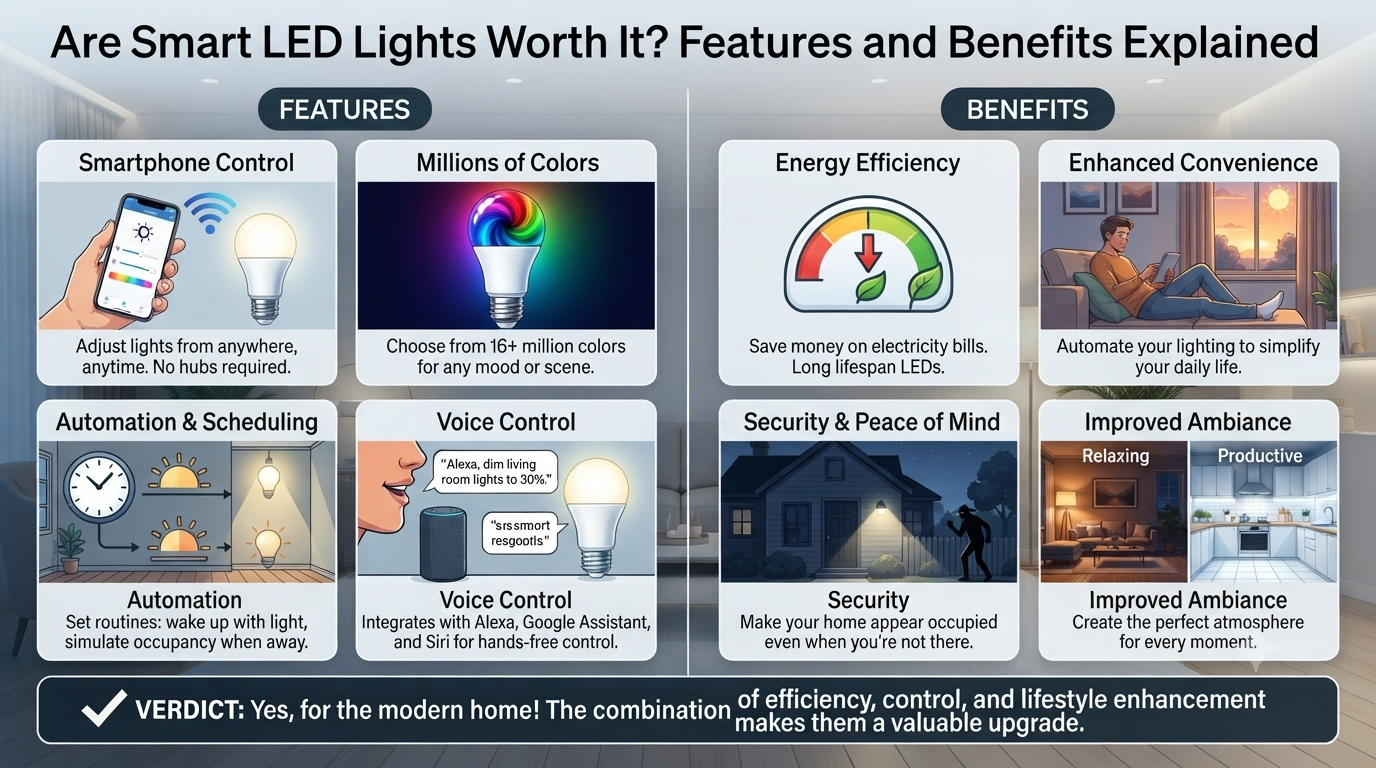
Then dimmers arrived, giving homeowners control over brightness. Now, smart LED lights have taken that concept much further. A smart bulb can be controlled from a smartphone, scheduled to turn on automatically, integrated with motion sensors, or connected to a broader smart-home ecosystem.
But does that make smart lighting the obvious choice?
Not necessarily.
For many rooms, a conventional dimmable LED light bulb paired with a reliable wall dimmer may be the more practical solution. It can be inexpensive, dependable, easy to operate, and completely functional without an internet connection.
Smart lighting, on the other hand, offers an entirely different level of control. You can adjust brightness from your phone, automate lights based on schedules, create scenes, change color temperature, and integrate lighting with other connected devices.
The real question is not whether smart bulbs are better than dimmable bulbs.
It is
- Which lighting system is better suited to the way you actually use your space?
This guide compares smart light bulbs and standard dimmable LED bulbs across installation, controls, energy consumption, compatibility, reliability, cost, color adjustment, automation, and long-term ownership.
Smart LED Lights vs. Standard Dimmable LED Bulbs
At first glance, these two technologies may seem similar.
Both allow you to control light output.
But they work in fundamentally different ways.
A conventional dimmable LED bulb relies on a compatible physical dimmer to regulate brightness.
A smart bulb contains electronics that allow the light source itself to communicate with a control system.
Here's the basic difference
- Standard dimmable setup
- Wall switch → Dimmer → Dimmable LED bulb
- Smart lighting setup
- Power → Smart LED bulb → Wireless or digital control
This distinction has major implications for installation and everyday use.
What Are Smart Light Bulbs?
A smart light bulb is an LED bulb with integrated electronics that enable remote or automated control.
Depending on the product, you may be able to control
- On/off status
- Brightness
- Color temperature
- Light color
- Scheduling
- Scenes
- Automation
- Motion-based activation
Some smart bulbs communicate directly through technologies such as Bluetooth, Wi-Fi, Zigbee, Thread, or other smart-home protocols.
The exact features depend on the manufacturer's ecosystem.
A basic smart bulb may only support smartphone control.
A more advanced system can coordinate dozens or even hundreds of lights across a home, office, hotel, or commercial environment.
What Is a Standard Dimmable LED Bulb?
A dimmable LED light bulb is designed to work with a compatible dimmer switch.
Instead of controlling the bulb wirelessly, the user adjusts the electrical signal supplied to the fixture.
The result is a familiar wall-mounted control.
Turn the knob.
Slide the control.
Press the button.
The brightness changes.
This approach is simple and highly intuitive.
There is no app to open, no wireless network to configure, and no account to create.
For many homeowners, that simplicity is the biggest advantage.
Side-by-Side Comparison
- Feature
- Smart LED Lights
- Standard Dimmable LED Bulbs
- Brightness Control
- App, voice, automation, or compatible switch
- Physical dimmer
- Remote Control
- Usually available
- Generally unavailable
- Scheduling
- Yes
- Usually no
- Color Temperature Adjustment
- Often available
- Usually fixed
- Color Changing
- Available on some models
- Generally unavailable
- Internet Required
- Depends on system
- No
- Wireless Connectivity
- Usually
- No
- Installation
- Simple bulb replacement, but setup may be required
- Requires compatible dimmer
- Reliability
- Depends on electronics and network ecosystem
- Generally simple and reliable
- Manual Wall Control
- Depends on setup
- Excellent
- Automation
- Advanced
- Limited
- Initial Cost
- Usually higher
- Usually lower
- Best For
- Connected homes and automation
- Simple, reliable brightness control
Neither option wins every category.
The right choice depends on your priorities.
The Biggest Difference: Control
The most obvious advantage of smart light bulbs is control.
Imagine you're sitting on the sofa.
Instead of getting up to adjust the dimmer, you can use your phone or voice assistant.
But smart lighting goes beyond convenience.
You can create automated lighting routines.
For example
7:00 AM: Kitchen lights gradually increase in brightness.
6:00 PM: Living room lights turn on.
8:00 PM: Lights shift to a warmer color temperature.
10:30 PM: Bedroom lights dim automatically.
11:00 PM: Exterior lights switch off.
This level of automation isn't possible with a conventional dimmer alone.
Smart Lighting Is About More Than Dimming
- A standard dimmable bulb typically controls one primary variable
Brightness.
Smart lighting can potentially control several.
Depending on the product, you may be able to adjust
- Brightness
- Color temperature
- Hue
- Saturation
- Timing
- Scenes
This creates a more flexible lighting environment.
For example, a smart bulb may produce cool, bright light during working hours and warmer, softer light in the evening.
The same physical bulb can serve different purposes throughout the day.
Tunable White vs. Fixed Color Temperature
This is one of the most useful features of advanced smart lighting.
A standard LED bulb generally has a fixed color temperature.
For example
- 2700K warm white
- 3000K soft white
- 4000K neutral white
- 5000K daylight
You choose the color temperature when purchasing the bulb.
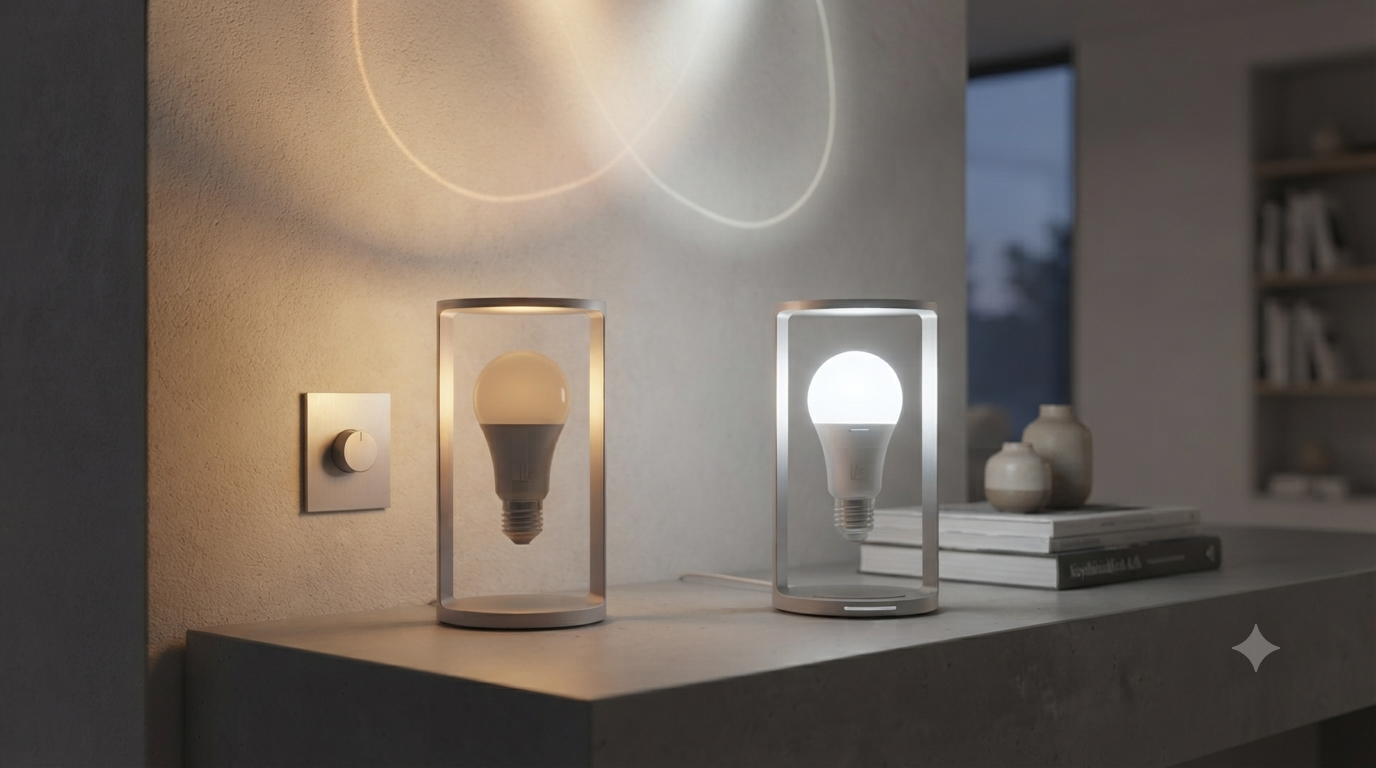
A tunable-white smart bulb allows you to adjust the color temperature electronically.
You might use
5000K: For focused daytime tasks.
4000K: For general household activity.
3000K: For evening use.
2700K: For a warm, relaxed atmosphere.
This can be particularly useful in multifunctional rooms.
Smart Bulbs With Color Changing
Some smart LED lights can produce millions of colors.
These are often marketed as RGB or RGBW lighting products.
They can be useful for
- Entertainment
- Gaming rooms
- Home theaters
- Parties
- Decorative displays
- Accent lighting
However, RGB lighting isn't always the best choice for general illumination.
A white LED designed specifically for high-quality white light may provide better color rendering and more natural illumination.
If you need a smart bulb for everyday room lighting, prioritize quality white-light performance over the number of colors it can produce.
What Is CRI and Why Does It Matter?
The Color Rendering Index, or CRI, indicates how accurately a light source reveals colors.
This matters in areas such as
- Kitchens
- Dressing rooms
- Bathrooms
- Art spaces
- Retail environments
A smart bulb may offer hundreds of colors but still provide mediocre white-light quality.
Don't be distracted by RGB features.
For everyday lighting, look for strong white-light performance and an appropriate CRI.
The ability to change color is a bonus—not necessarily a substitute for good illumination.
The Dimming Experience
Standard dimmable LED bulbs have improved considerably.
A good-quality dimmable LED should provide smooth brightness adjustment without
- Flickering
- Buzzing
- Sudden jumps
- Dropouts
However, compatibility is critical.
Not every LED bulb works correctly with every dimmer.
Older dimmers designed for incandescent lamps may not provide the electrical characteristics required by modern LED drivers.
This can lead to
- Flicker
- Limited dimming range
- Buzzing
- Failure to turn fully off
If you install a dimmable LED light bulb, verify that the dimmer is LED-compatible.
Smart Bulbs and Traditional Dimmers: A Common Compatibility Problem
One of the biggest mistakes homeowners make is installing a smart bulb behind a traditional dimmer.
Generally, smart bulbs need a continuous power supply so their internal electronics remain active.
If you turn off the wall switch, the smart bulb loses power.
You can no longer control it remotely.
If you use a conventional dimmer, you may also interfere with the smart bulb's electronics.
The result can be
- Flickering
- Unpredictable brightness
- Loss of connectivity
- Inability to control the bulb
If you want smart lighting, the electrical control system should be designed around the smart bulb.
Smart Bulbs vs. Smart Switches
There's another option that often gets overlooked.
Instead of installing smart bulbs, you can install smart switches.
A smart switch controls conventional bulbs at the circuit level.
This can be useful when
- You want physical wall control
- Multiple bulbs are installed in one fixture
- You don't want to replace every bulb
- You want centralized control
For example, a chandelier with ten standard LED bulbs may be easier to automate using one smart switch rather than installing ten individual smart bulbs.
However, smart switches and smart bulbs solve different problems.
A smart switch controls the circuit.
A smart bulb controls the light source.
Choose accordingly.
Standard Dimmable Bulbs: The Reliability Advantage
A conventional dimmable LED system has fewer points of failure.
There is
- No Wi-Fi connection
- No app
- No cloud account
- No firmware updates
- No wireless pairing
The wall switch works.
The dimmer works.
The bulb works.
For many rooms, that's enough.
This simplicity can be particularly valuable in
- Rental properties
- Guest rooms
- Offices
- Bedrooms
- Areas used by children or elderly family members
You don't need a smartphone to turn the light on.
Smart Lighting: The Convenience Advantage
Smart lighting wins when convenience and automation matter.
Imagine you're away from home.
You receive a notification that movement was detected.
You can turn exterior lights on remotely.
Or perhaps you're returning home late.
Your driveway lighting can activate automatically before you arrive.
These aren't capabilities that a conventional dimmer can provide on its own.
Smart lighting becomes particularly powerful when combined with
- Motion sensors
- Door sensors
- Security cameras
- Smart thermostats
- Voice assistants
- Home automation systems
The lighting becomes part of a broader ecosystem.
Does Smart Lighting Save Energy?
It can—but not automatically.
LED technology itself provides the primary energy-efficiency advantage.
Smart functionality adds another layer.
For example, automation can prevent lights from being left on unnecessarily.
Scheduling can turn lights off at specific times.
Motion sensors can activate lights only when someone is present.
Dimming can reduce power consumption.
However, the smart electronics themselves consume a small amount of standby power.
For a single bulb, this is usually minor.
Across dozens of continuously connected devices, it can become more noticeable.
The greatest energy savings typically come from
- Efficient LEDs + sensible brightness + automation + occupancy control
Not simply from having a Wi-Fi connection.
Which Is More Cost-Effective?
A standard dimmable LED bulb is generally less expensive to purchase.
But cost isn't only about the bulb.
Consider the complete system.
Standard Dimmable System
- You may need
- Dimmable LED bulbs
- LED-compatible dimmer
- Smart Lighting System
- You may need
- Smart bulbs
- Hub or bridge, depending on the ecosystem
- Smart switches or wireless controls
- Additional sensors
The initial investment for smart lighting can be higher.
However, the value may justify the cost if you actively use
- Automation
- Remote control
- Scheduling
- Color adjustment
- Multi-room scenes
If you only want to dim your living room lights, a standard dimmer is probably the more economical solution.
Smart Lighting Ecosystems
The word "smart" doesn't describe one universal technology.
Different ecosystems use different communication methods.
Common technologies include
- Wi-Fi
Connects directly to your home network.
Advantages
- No dedicated hub may be required
- Easy setup for some users
- Potential disadvantages
- Adds devices to your Wi-Fi network
- Performance depends on network reliability
- Bluetooth
Useful for direct local control.
Advantages
- Simple
- Low power
- Potential disadvantages
- Shorter range
- Less suitable for large installations without additional infrastructure
- Zigbee
A low-power wireless protocol often used in smart-home devices.
Advantages
- Designed for connected devices
- Mesh networking capabilities
- Potential disadvantages
- May require a compatible hub or bridge
- Thread
A newer low-power mesh networking technology increasingly used in smart-home ecosystems.
Its role continues to expand as smart-home interoperability improves.
The important point is to check compatibility before building a large system.
The Importance of Ecosystem Compatibility
Imagine purchasing ten smart bulbs.
Then you discover that your preferred voice assistant or smart-home platform doesn't fully support them.
Or perhaps you purchase products from several manufacturers that use incompatible ecosystems.
Now you have multiple apps and disconnected systems.
Before buying smart lighting, decide what ecosystem you want to use.
Consider compatibility with
- Your smartphone
- Voice assistants
- Smart-home platform
- Sensors
- Automation systems
- Existing smart devices
For larger installations, choosing one ecosystem can make management significantly easier.
Smart Bulbs and Internet Dependence
Not all smart bulbs require continuous internet access.
Some can continue functioning locally through
- Bluetooth
- Local network control
- Hub-based systems
Others rely more heavily on cloud services.
This distinction matters.
If your internet connection fails, you may lose
- Remote access
- Cloud-based automation
- Certain voice commands
The physical light may still operate, depending on the system.
Before buying, determine what happens when
- Wi-Fi fails
- Internet access is unavailable
- The manufacturer's cloud service is temporarily unavailable
For critical lighting, local control is worth considering.
Standard Dimmable LED Bulbs Are Better for Some Rooms
Not every room needs smart technology.
A bedroom may only require
- Warm white lighting
- Smooth dimming
- Simple wall control
A standard dimmable LED bulb can handle this perfectly.
The same applies to
- Guest rooms
- Small offices
- Hallways
- Utility areas
Installing smart bulbs everywhere can add unnecessary complexity.
Use smart lighting where it provides genuine value.
Smart Lighting Is More Useful in Multifunctional Spaces
Smart technology makes more sense when one room serves multiple purposes.
Consider a living room.
During the day
Bright neutral white light for reading or working.
In the evening
Warm dimmed light for relaxation.
During a movie
Very low brightness or accent lighting.
For a party
Color-changing effects.
One lighting system can accommodate all four scenarios.
This is where smart lighting can outperform a conventional dimmer.
Practical Room-by-Room Recommendations
- Room
- Recommended Solution
- Living Room
- Smart bulbs or dimmable LEDs
- Bedroom
- Dimmable LEDs; smart option for schedules
- Kitchen
- Dimmable LEDs or tunable smart lighting
- Bathroom
- Quality dimmable LEDs with appropriate fixtures
- Home Office
- Tunable white smart lighting can be useful
- Hallway
- Standard LEDs or motion-enabled smart lighting
- Outdoor Security
- Smart lighting with sensors and automation
- Entertainment Room
- Smart RGB/RGBW lighting
- Guest Room
- Standard dimmable LEDs
The ideal solution varies according to how the room is used.
How to Choose the Right System
- Ask yourself
- Do I Need Remote Control?
If yes, consider smart lighting.
Do I Need Only Brightness Adjustment?
A standard dimmable LED bulb may be sufficient.
Do I Want Color Temperature Control?
Choose tunable-white smart bulbs.
Do I Need Color-Changing Effects?
Look for RGB or RGBW smart lighting.
Do I Want Automatic Scheduling?
Smart lighting is the better choice.
Do I Want Maximum Simplicity?
Choose standard dimmable LEDs.
Do I Want Physical Wall Control?
Consider dimmable bulbs or a smart switch designed for your setup.
Common Mistakes With Smart LED Lights
- Mistake 1: Installing Smart Bulbs on a Traditional Dimmer
This can cause compatibility problems.
Mistake 2: Choosing Based Only on Number of Colors
White-light quality is more important for everyday illumination.
Mistake 3: Ignoring Ecosystem Compatibility
Not every smart product works seamlessly with every platform.
Mistake 4: Forgetting Wi-Fi Coverage
A weak network can create unreliable control.
Mistake 5: Overcomplicating Simple Rooms
A smart bulb isn't necessary everywhere.
Mistake 6: Ignoring Manual Control
Consider what happens when your phone isn't available.
Mistake 7: Buying Cheap Smart Bulbs Without Checking Specifications
Poor drivers, low CRI, unreliable connectivity, and limited firmware support can create long-term frustration.
Common Mistakes With Dimmable LED Light Bulbs
- Mistake 1: Using an Incompatible Dimmer
LED bulbs require appropriate dimming technology.
Mistake 2: Mixing Incompatible Bulbs
Different LED models may behave differently on the same dimmer.
Mistake 3: Expecting 0–100% Dimming
Some LED bulbs have a narrower practical dimming range.
Mistake 4: Ignoring Flicker
Poor-quality drivers can create visible or camera-detectable flicker.
Mistake 5: Overloading the Dimmer
Always follow the manufacturer's electrical ratings.
Expert Buying Checklist
- Before purchasing smart LED lights, check
- Wireless protocol
- Smart-home compatibility
- Hub requirements
- Lumens
- Wattage
- Color temperature
- CRI
- Dimming range
- RGB/RGBW capability
- App quality
- Voice control
- Local control options
- Firmware support
- Warranty
- For a dimmable LED light bulb, check
- Dimmability rating
- Compatible dimmers
- Minimum dimming level
- Maximum brightness
- Flicker performance
- Lumens
- Color temperature
- CRI
- Expected lifespan
The bulb is only one part of the system.
Compatibility between the bulb and the control equipment is equally important.
Frequently Asked Questions
- Are smart LED lights better than dimmable LED bulbs?
Neither is universally better. Smart LED lights offer remote control, scheduling, automation, and often color-temperature adjustment. Standard dimmable LED bulbs are simpler, generally less expensive, and easier to operate manually. Choose smart lighting when automation and connected control provide genuine value.
Can smart light bulbs be used with a normal dimmer?
Generally, smart bulbs should not be connected to conventional wall dimmers unless the manufacturer specifically states that the combination is compatible. Smart bulbs typically require a stable power supply for their internal electronics and should be controlled through their intended app, smart switch, or wireless system.
Do smart bulbs use more electricity than standard LED bulbs?
The LED itself remains highly efficient, but smart bulbs contain additional electronics that consume a small amount of standby power. In practice, smart lighting can still reduce overall energy consumption when automation, scheduling, motion detection, and dimming prevent lights from operating unnecessarily.
Are dimmable LED light bulbs worth it?
Yes, if you want straightforward brightness control without building a smart-home system. A quality dimmable LED bulb paired with a compatible LED dimmer provides reliable, familiar operation and is often the most practical choice for bedrooms, living rooms, dining areas, and other spaces where remote control isn't necessary.
Final Takeaway: Choose the Technology That Solves a Real Problem
The debate between smart LED lights and standard dimmable LED light bulbs isn't really about which technology is more advanced.
It's about which technology makes sense for your lifestyle.
If you want simple brightness control, a high-quality dimmable LED bulb and compatible dimmer remain hard to beat. The system is straightforward, reliable, and easy for everyone in the household to use.
If you want lighting that responds to your routines, integrates with sensors, adjusts color temperature throughout the day, or can be controlled remotely, smart light bulbs open up a much broader range of possibilities.
For many homes, the best solution may be a combination of both.
Use standard dimmable LEDs in rooms that only need basic brightness adjustment. Install smart bulbs where automation, remote access, or tunable lighting genuinely improves the experience.
The most important thing is to design the system before buying the hardware.
Think about lumens, color temperature, CRI, dimming compatibility, control methods, wireless protocols, and long-term reliability. Don't buy a smart bulb simply because it has more features, and don't choose a conventional dimmer simply because it's cheaper.
Good lighting technology should make your life easier—not add another layer of complexity.
The smartest lighting system is ultimately the one that gives you the right amount of control, exactly where you need it, without paying for features you'll never use.